

FAQ
What is explore my data?
It is a new Jisc developed platform which allows users secure, easy to use access to Jisc data and data products. Products available on the platform include Interactive insights, Tailored datasets and Consultancy reports and the platform facilitates the Provider Preview service.
The platform is secured with login and multifactor authentication (MFA) utilising a permission system to allow customers to only see data products to which they are subscribed.
How do I sign into the platform?
Access to the platform for secure content is done using a Jisc developed authentication system called Keystone Gateway which allows passwordless login. When you click the button to login or follow registration email link you will be passed onto this system to login.
If Keystone Gateway recognises your email domain as part of the UK Access Federation it will pass you onto your organisation's single sign on (SSO).
If your organisation is not part of the UK Access Federation, the platform will send you an email with an access code.
Here is a little more detail on how this works.
Step 1: Click Login - Explore my data or follow the email registration link you received.
Step 2: Input your email into the box and click continue.
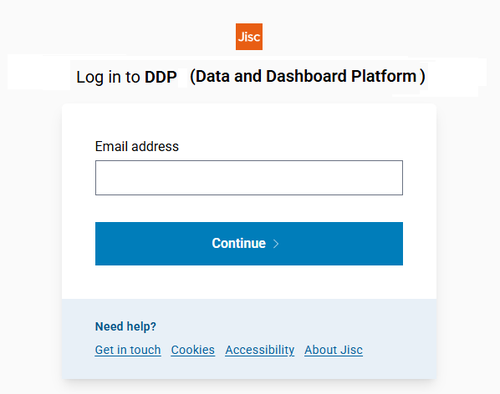
Step 3:
If your organisation is a member of the UK Access Federation
You will be directed to your organisation's single sign-on (SSO). Login here. You will be redirected back to the platform to access as required.
If your organisation is not a member of the UK Access Federation
You will be directed to this webpage:
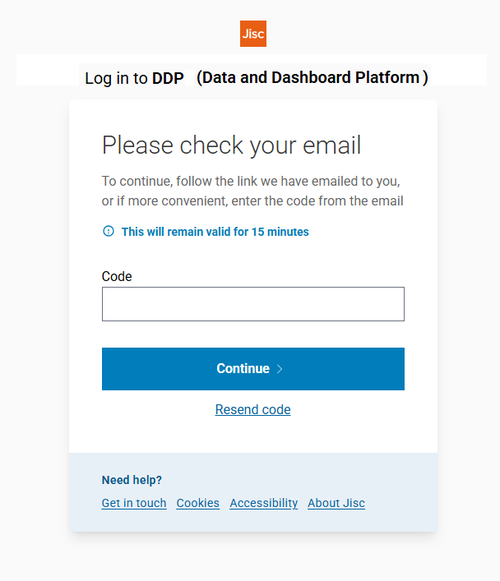
You will receive an email from [email protected]
Please note:
At the time of writing the link in the email does not work (this is a known issue). Please use the code within the email in the box shown in the screenshot above.
Will I be required to set up multi factor authentication (MFA)?
If your organisation is not a member of the UK Access Federation you will be required to set-up MFA for security purposes.
How to set up MFA
- You will be prompted to authenticate by either installing an app onto a mobile phone, adding the Data and Dashboard platform to your existing authenticator app or via a browser.
- Scan your unique QR code using your mobile phone camera, or the browser plug-in if you have opted for a browser based authentication.
- Approve via the app.
- Recovery codes are available for view or download.
More information about MFA at Jisc can be found here.